1C:SSL: Additional Attributes and Information. How to Add a New Field to a Document Without Modifying the Configuration

SSL: Additional Attributes and Information. How to Add a New Field to a Document Without Modifying the Configuration
Disclaimer: Everything described in this article is accurate for 1C:ERP Prime 2.0.0.35, SSL version 3.1.10.277, and 1C:Enterprise platform version 8.3.27.1936.
If you are using a different configuration, a different platform version, or a different SSL version, the overall logic of the mechanism remains the same, but command locations, form names, and some implementation details may differ slightly.
Here is another common real-world scenario: sales managers want to specify a delivery priority directly in a sales order.
They want to open the document form, select a delivery priority, most likely from a list, and save the document with the selected priority.
At first glance, the task looks very simple. We only need to add one more attribute to the SalesOrder document.
A developer could open Designer right away, add a new attribute to the document, place it on the form, apply the changes to the infobase, and then check access rights, data exchanges, and everything else affected by the change.
But before adding a new attribute to the document, it is worth asking one question:
Does this field really need to be added to the document as a new metadata attribute?
Sometimes the answer is no.
If the field is needed only as a user-defined note, classification, or simple value used for analysis, customizing the metadata object may be unnecessary.
There is another important consideration. If the configuration is under support, modifying a standard object can make future updates more difficult. For one simple user-defined field, changing a metadata object and the document structure may not be worth it.
This is where the standard SSL Additional Attributes and Information mechanism can help.
That is the mechanism we will look at in this article.
In short, SSL provides a mechanism that lets you add user-defined data to objects without changing the structure of the metadata objects themselves.
Put simply, you can add a new field to a document, catalog, or other object through settings in 1C:Enterprise mode rather than by adding an attribute in Designer.
Of course, this only works if the object is already integrated with the Additional Attributes and Information mechanism. In our example, the SalesOrder document is already integrated with it, so we can configure a new field in 1C:Enterprise mode.
After that, the user will be able to open a sales order, select a delivery priority, and save the document with the selected priority.
And we will not add a new attribute to the SalesOrder document itself.
A quick note before we continue: the name of the mechanism contains two concepts, additional attributes and additional information.
Although they are similar, they are used in different ways.
An additional attribute is a user-defined field that is usually displayed directly on an object form.
For example, the screenshot below shows a product form where the Color and Size fields are not attributes of the Products catalog. Instead, they are configured as additional attributes. As you can see, however, they look no different from regular catalog attributes such as SKU or Description.
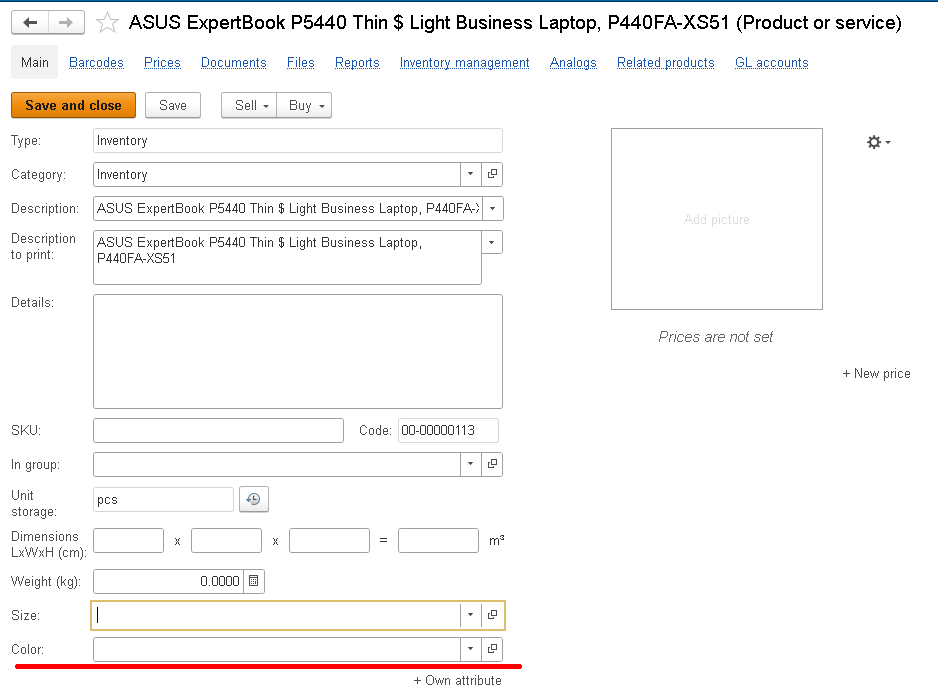
For an ordinary user, an additional attribute therefore looks almost like a regular object attribute. The field appears on a catalog item form or document form, the user can fill it in, and the value is still there when the object is opened again.
Additional information is extra data about an object that is usually treated not as a field on the main form, but as information kept separately from the main form.
For example, for a counterparty you might store the date of the most recent security review:
Last security review date = 08/15/2026
For a contract, you might store the folder number in the paper archive:
Archive folder = A-17/2026
This information belongs to the object, but it does not always need to be part of its main form.
A simple way to remember the difference is this: an additional attribute is a field in an object, while additional information is information about an object.
This is not a strict technical definition, but it explains the basic difference well.
How Are They Different?
The difference becomes clearer when you look at it from the user's point of view.
| Question | Additional attribute | Additional information |
|---|---|---|
| Where does the user usually see the value? | On the object form | In a separate form opened by a dedicated command |
| How does the user see it? | As an additional field of the object | As additional information about the object |
| When is it useful? | When the field needs to be filled in directly on an object or document form | When the information belongs to the object but should not overload the main form |
Below, we will focus on additional attributes because our task is to add a new field directly to the sales order form.
So, here is what we want to do.
Users want to see a new field on the Sales order form: Delivery priority.
The field can have several values, for example: Low, Normal, High, and Urgent.
A sales manager can select Urgent, and other users will immediately understand that the order needs to be processed faster than usual.
One important point: in our example, this field does not participate in document posting, does not affect calculations or register records, and is not part of complex business logic.
That makes an additional attribute a good fit for this task.
And we want to achieve the result without modifying the configuration, which means without changing its structure or code.
Enough theory. Let's get started!
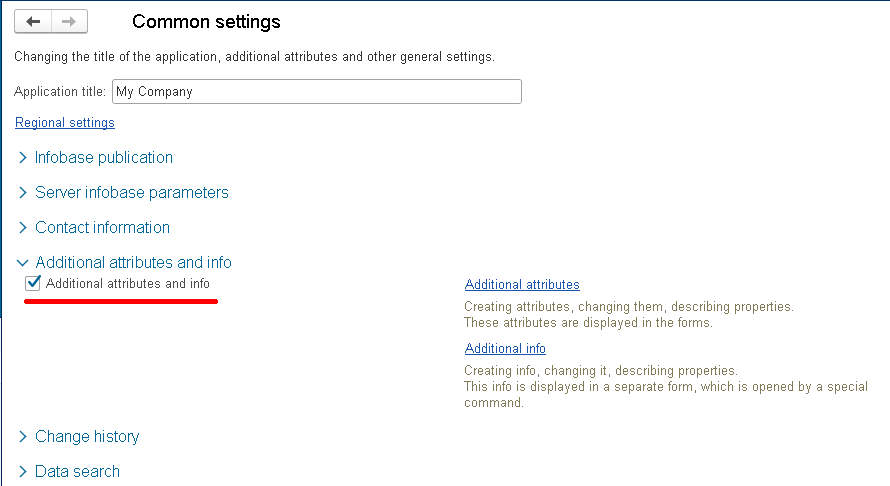
First, check whether Additional attributes and info is enabled.
Go to Settings > Common settings.
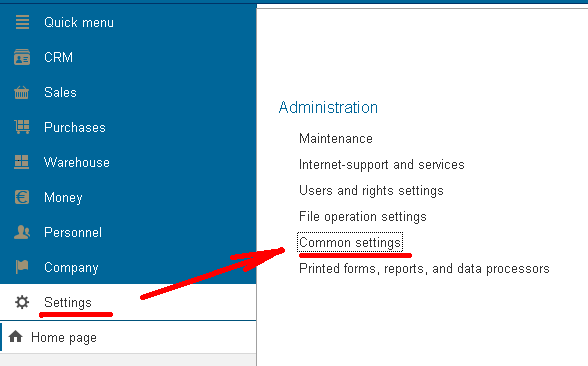
Until the mechanism is enabled, users cannot create and use additional fields.
Once it is enabled, the Additional attributes and Additional info links become available.
Now we can start configuring additional attributes.
Additional attributes are usually configured in a dedicated settings form rather than directly in the document.
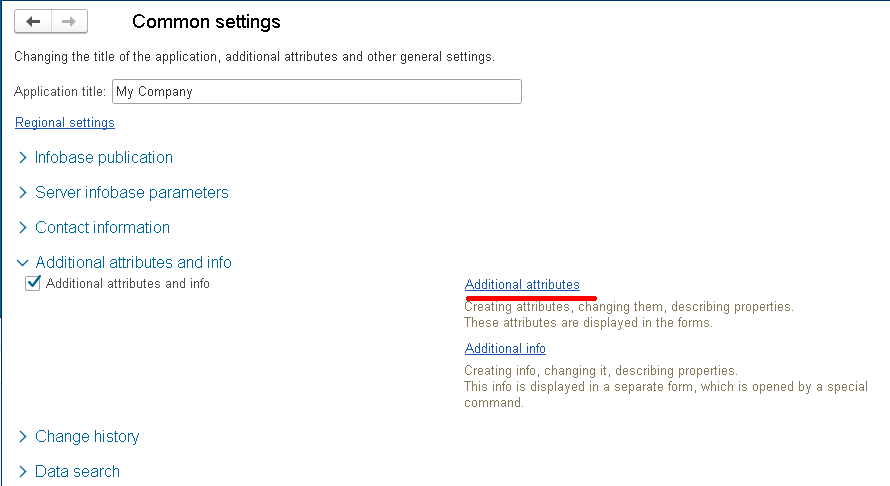
The Additional attributes form shows groups of additional attributes for different objects.
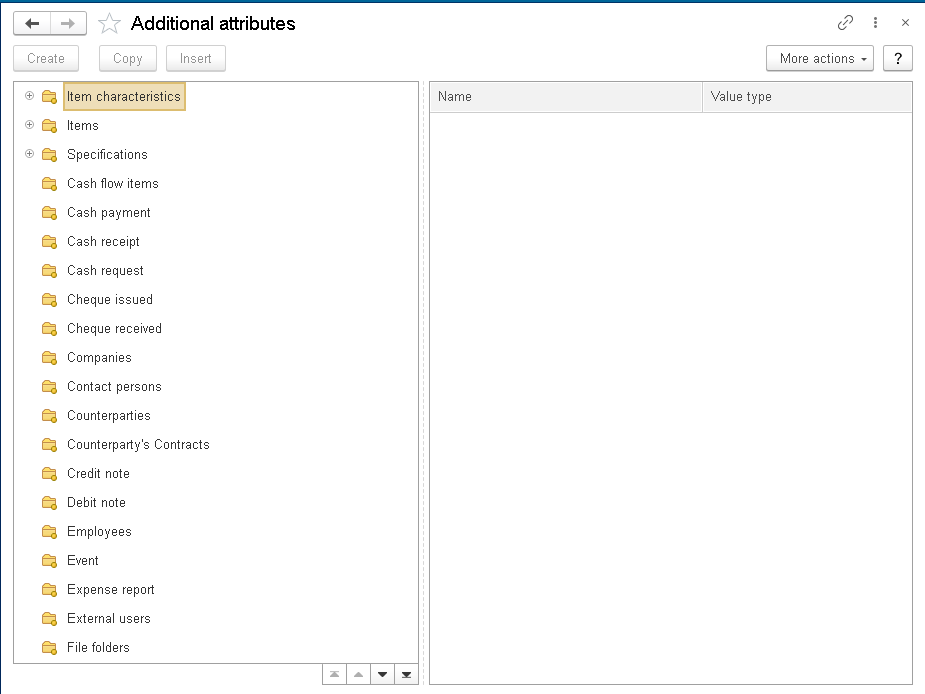
Each group is associated with a specific object or group of objects.
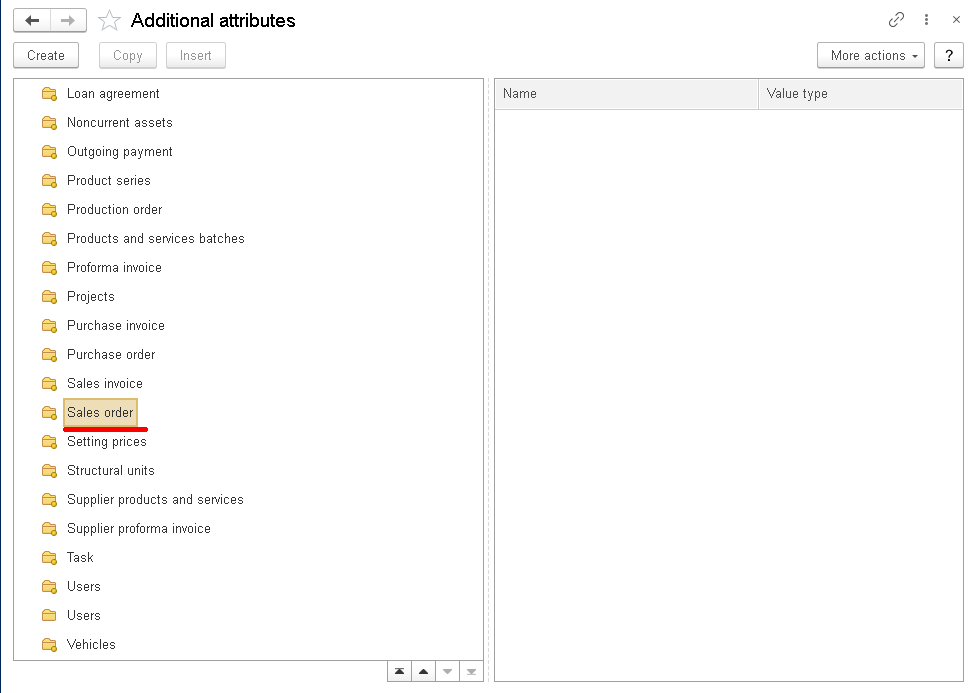
We need the group for Sales order.
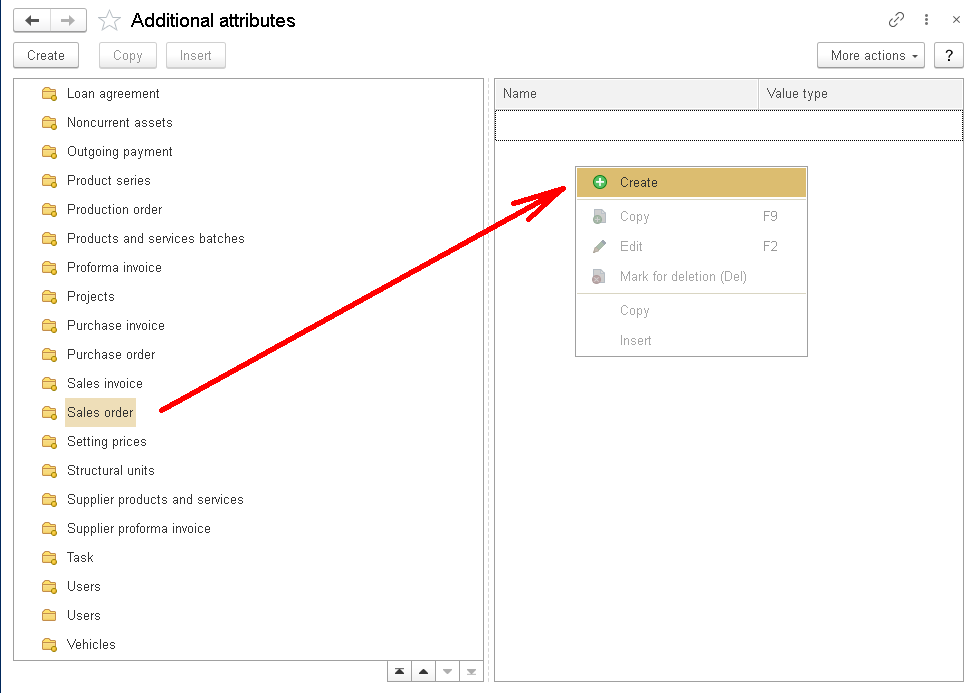
Open the group for Sales order and create a new additional attribute.
Add a new additional attribute named Delivery priority.
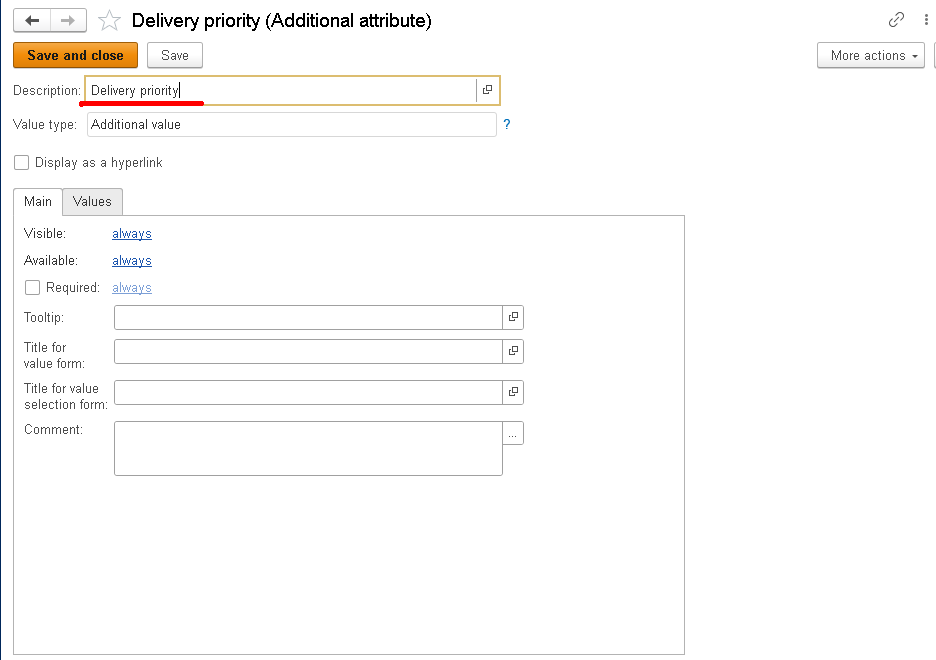
As we already know, we do not want free-form text. We want the user to select from a predefined list.
Why does this matter? If we make the field a regular string, users will enter the value in different ways.
One user might enter “Urgent”, another “urgent”, and someone else might type “Very urgent”.
Later, it would be much harder to filter or analyze the data reliably.
So for this attribute, set Value type to Additional value and define the allowed values on the Values tab.
Add the following values: Low, Normal, High, and Urgent.
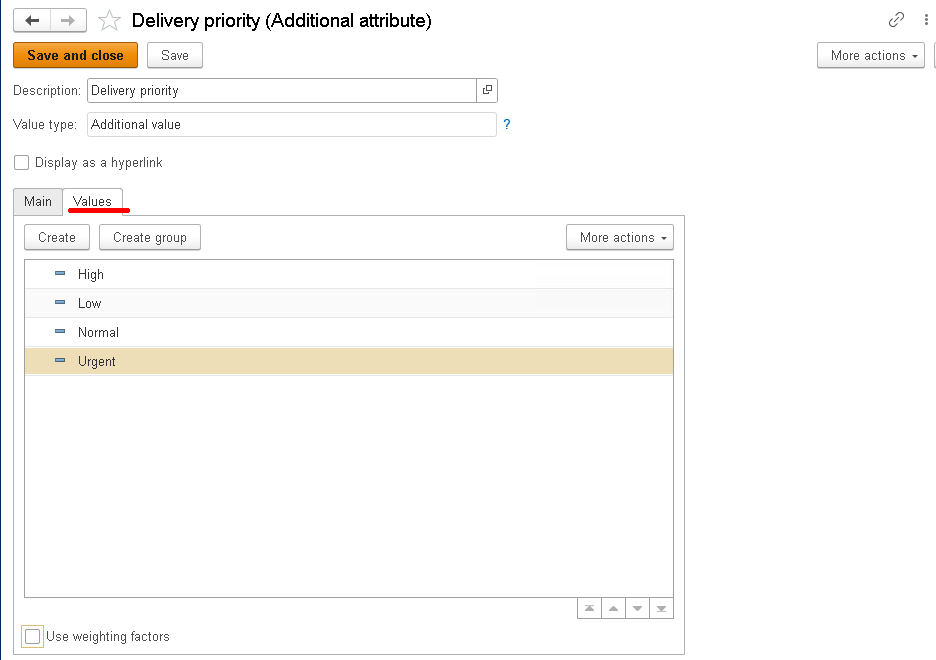
Then click Save and close.
The mechanism now knows that the SalesOrder document has an additional attribute called Delivery priority and that it can take one of the predefined values.
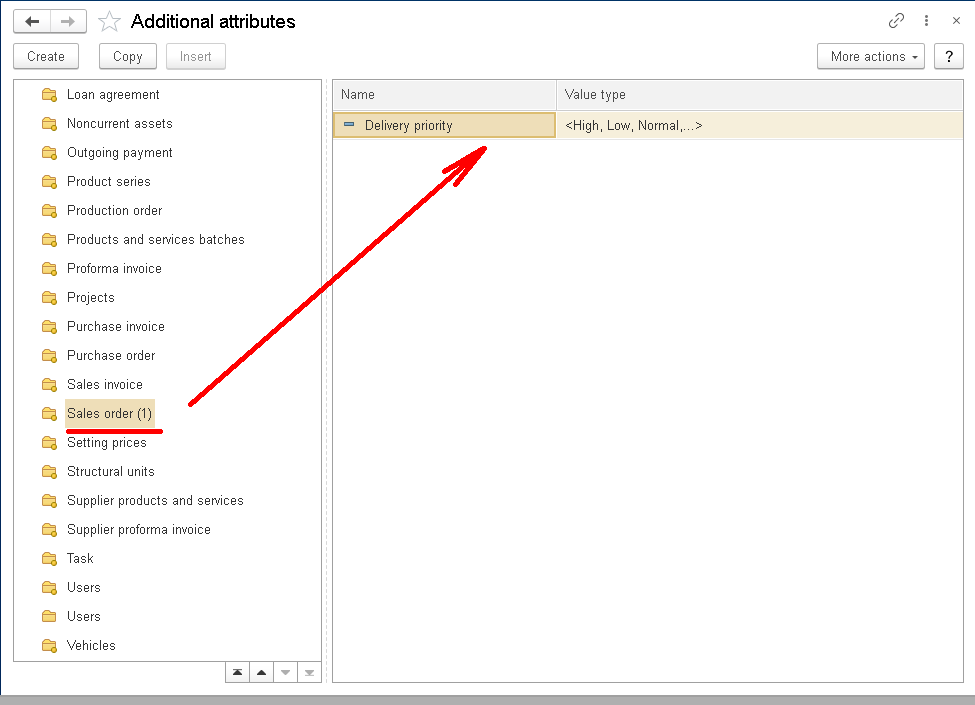
Check the Field on the Sales Order Form
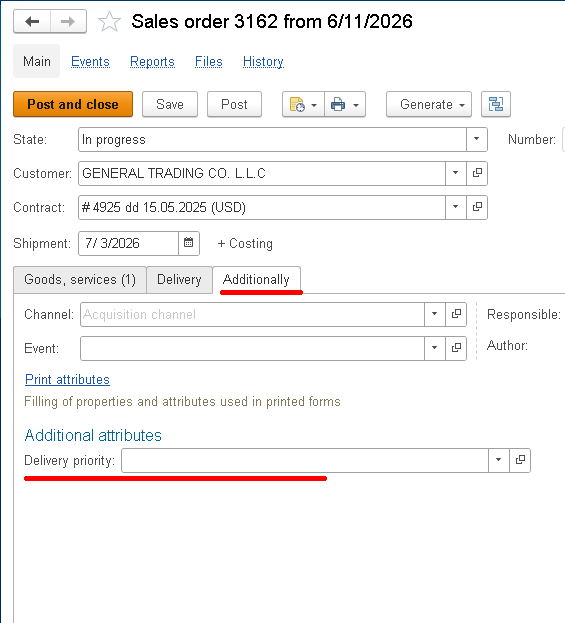
Open a sales order form. You can create a new document or open an existing one.
A new field should appear on the document form:
For example, select Urgent:
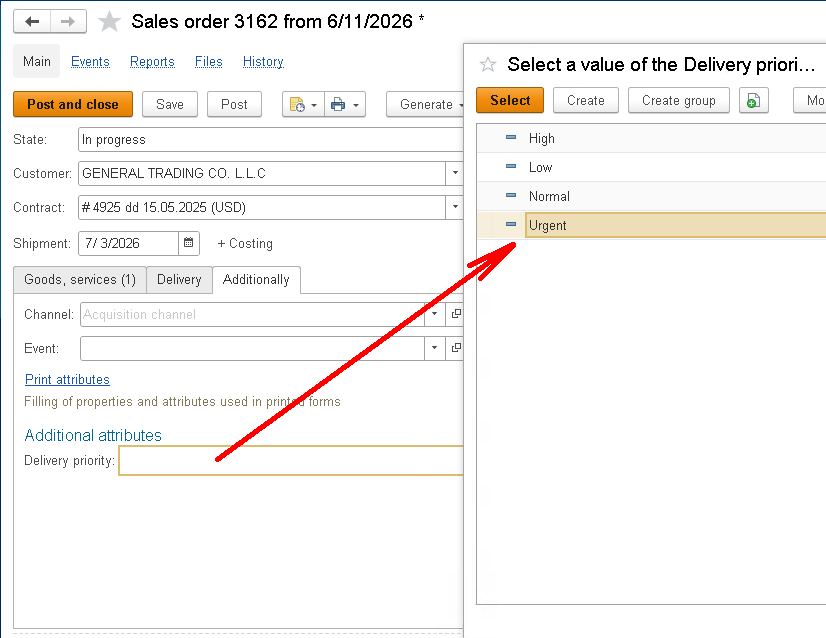
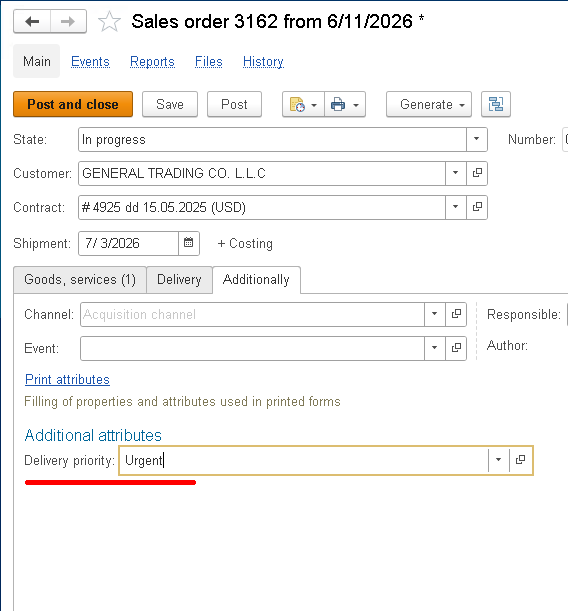
Save the document, close the form, and open it again.
As you can see, the value has been saved.
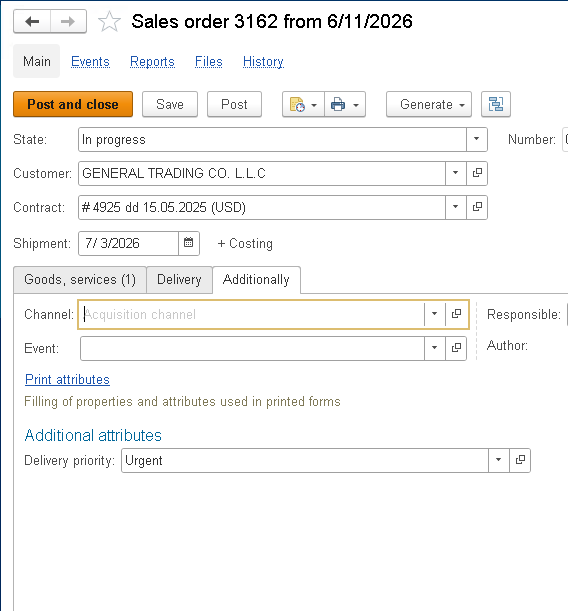
From the user's point of view, the task is complete: the order now has a new field where they can select the appropriate priority.
From a developer's point of view, we did not add any attributes to the SalesOrder document and did not modify the configuration.
So what is the main advantage of this SSL mechanism?
The biggest advantage is speed and flexibility.
The Additional Attributes and Information mechanism is a good fit when you need to add simple user-defined data for analysis, an additional classification field, a field needed only by some users, or something similar.
Our Delivery priority field is a good example.
It is useful for a sales manager to see the delivery priority directly in the order. But the field does not participate in document posting or change the accounting logic.
Another important advantage is that you can avoid unnecessary changes to a configuration that is under support.
The Additional Attributes and Information mechanism lets you add a user-defined field without modifying the metadata object.
So the result is:
- the new field appears on the form;
- the user can fill it in;
- the value is saved;
- the document structure remains unchanged;
- we did not have to modify the object just to add a simple user-defined field.
This is particularly useful for small tasks that matter to users but are not part of the core business logic.
At the same time, additional attributes cannot replace configuration customization when a field is part of the core business logic.
This distinction is important.
If every new field is automatically implemented as an additional attribute, the result can quickly become chaotic: overloaded forms, unclear settings, more complicated reporting, and so on.
A regular metadata attribute is usually a better choice if the field:
- participates in document posting;
- affects register records;
- is used in calculations;
- is required for data exchanges with other systems;
- is used in performance-sensitive reports;
- requires complex validation when the object is saved;
- or is otherwise part of core business logic.
For example, when Delivery priority starts affecting automatic reservation, shipment date calculation, delivery routing, or data exchange with an external delivery service, it is no longer just a user-defined note.
In such a case, it is worth considering implementing it as a regular document attribute by customizing the configuration.
A useful rule of thumb is this: if the field is needed for user convenience and simple analysis, an additional attribute is a good option. If the field becomes part of the core business logic, it should usually be a regular attribute in the configuration.
Let's look at some common mistakes when using the Additional Attributes and Information mechanism.
1. Confusing Additional Attributes with Additional Information
A user expects to see a field directly on the document form, but the developer or administrator configures additional information instead.
As a result, the data is there, but it does not appear where expected.
So before configuring anything, first determine how users are supposed to interact with the data.
2. Using an Additional Attribute for Critical Business Logic
An additional attribute is convenient for user-defined data, but using it for core business logic requires careful consideration.
If the field affects posting, calculations, data exchanges, or important reports, consider adding a regular attribute and customizing the object instead.
3. Not Choosing the Value Type in Advance
A common situation is to create an additional attribute as a string first, and then realize that a predefined list is actually needed.
For our Delivery priority example, a string is not the best option.
Users could enter the same priority in different ways, which would make filtering and analysis difficult because the values would not be consistent.
For cases like this, use a predefined list of values, as we did above: Low, Normal, High, Urgent.
4. Creating Too Many Additional Attributes
The mechanism is convenient, so it can be tempting to use it for everything.
But if too many additional fields appear on a form, the document becomes harder to use.
Additional attributes should make the form more useful, not turn it into a collection of unrelated fields.
5. Expecting an Additional Attribute to Completely Replace a Regular Attribute
An additional attribute is a useful tool, but it is not a universal replacement for configuration customization.
It provides useful flexibility for user-defined data, but it should not automatically replace a carefully designed data structure when a field is genuinely important to accounting logic.
To sum up, Additional Attributes and Information is a standard SSL mechanism that lets you add user-defined data without changing the object structure.
In this article, we looked at a simple example: we added the Delivery priority additional attribute to a sales order document with the values Low, Normal, High, and Urgent.
As a result, the user got a new field in the document, while we did not add a new attribute to the SalesOrder document and therefore did not modify the configuration.
This is convenient when you need to quickly add user-defined data for analysis, a note, or a classification. It is especially useful when the configuration is under support and you do not want to modify a standard object just to add a small field.
But it is important to keep this distinction in mind.
If the field is needed for user convenience and simple analysis, the Additional Attributes and Information mechanism is an excellent fit.
If the field becomes part of the core business logic, a regular attribute in the configuration is usually the better approach.
In Part 2, we will look at this mechanism from a developer's perspective. We will first briefly discuss additional information, then examine the subsystem internals, value storage, reading values from code, and the use of additional attributes and information in reports and data processors.

Writen by
1C Developer
20+ years of experience in the software industry in Russia, UAE and Germany. My main fields of expertise are developing and implementation of business applications (Retail, CRM, WMS, and Accounting) and integration of software with POS equipment and web portals.


