1C Server Cluster. Part 2. Fault Tolerance and Scalability

This part builds on Part 1 (Cluster Architecture) and explains how the cluster provides fault tolerance and scalability in real-world operation.
From Monolith to Sessions
As the platform evolved, the originally monolithic 1C server was split into multiple services. One key outcome was the separation of the application state from the active connection to a worker process (rphost). This introduced the concepts of sessions and session data, which now had to be stored outside the worker process. To support this, a session data service was developed to store and cache the information.
Since the data required for operation are now stored outside the current client and worker process connection, if a worker process fails, the next call from the client switches to another available worker process. In most cases, this switch is transparent to the client.
How the Retry Mechanism Works
If a client call to a worker process does not complete, the client can retry it after receiving an error by reestablishing a connection either to the same worker process or to another one. However, a retry is not always possible. A retry means the call was sent to the server but no result was returned. Before attempting it again, the system evaluates what happened on the server during the previous call. This information is stored in the session data. If the previous call left traces on the server (for example, if a transaction was closed or session data were saved), repeating it is unsafe because it could lead to data inconsistency. In this case, the client receives a fatal error, the application must be restarted, and the user will see an error message.
If the previous call left no traces, which is the most common case, the call can be retried safely. Many calls do not change data, such as generating reports or rendering data on a form, and even calls that do change data leave no traces until a transaction is committed, or session data are sent to the manager. If a worker process fails or the network connection breaks, such a call is retried automatically, and the incident is invisible to the client application. For the user, it appears only as a short freeze, after which they can continue working as usual.
What Happens at a Lower Level
When a worker process ends abnormally, the server cluster launches a new worker process. The cluster then tries to transfer all client sessions from the terminated process to the new one. During this transfer, users may notice short pauses when the client application stops responding and appears to hang.
Workflow Backup
To reduce delays during session switching, the server cluster provides a mechanism called Workflow Backup. When enabled, it creates special backup worker processes.
This mechanism is configured per infobase rather than globally for the entire server. See Infobase parameters → Workflow backup in the screenshot.
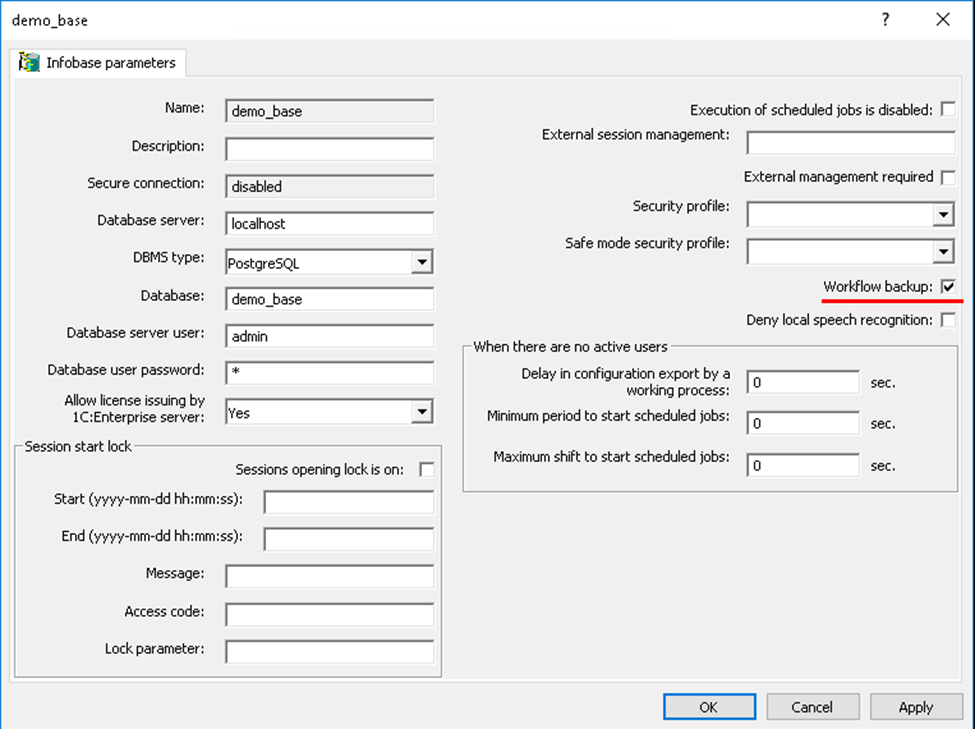
Infobases with Workflow Backup enabled are called reserved. The administrator can specify which infobases require backup worker processes.
Once workflow backup is enabled, the following occurs:
- On the servers that host the reserved infobases, backup worker processes are started.
- These processes load the metadata of the reserved infobases.
- If necessary, client sessions are switched to the backup worker processes, which already contain all required information. The switch is fast.
- After a backup worker process becomes a normal one, the backup flag is cleared. The server cluster then restores the required number of backup worker processes by launching new ones.
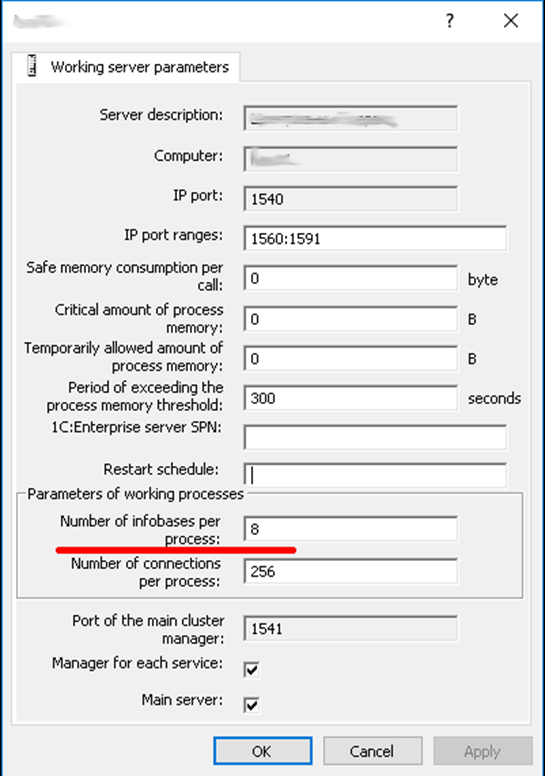
The number of backup worker processes is determined by the property Number of infobases per process in the server node parameters. See server node parameters → Number of infobases per process in the screenshot.
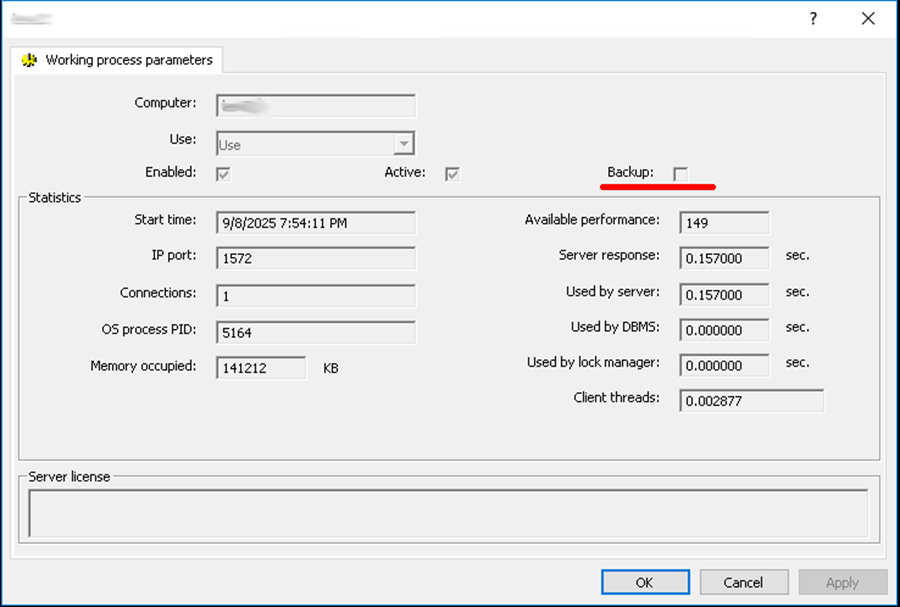
If a worker process serves as a backup, its properties show the Backup checkbox as selected. This checkbox is cleared once the worker process becomes active. See Working process parameters → Backup in the screenshot.
Redundancy at the Cluster Level
Workflow backup can be used even when the cluster contains only one server node. If the cluster includes several servers, redundancy can be applied to the cluster itself. When one server fails, the others continue to operate, and users do not lose their data.
A fault-tolerant cluster can include any number of server nodes. This is similar to an active/active scheme, where calls to a failed node are redistributed among the remaining nodes.
We will look at how load balancing works in this case a bit later, since it is a dedicated topic of its own. For now, let us see how the cluster ensures scalability.
Scalability
The server cluster can be scaled in two main ways:
- Increase the computing power of the computer that hosts the cluster’s single server node.
- Add one or more new server nodes to the cluster.
All actions required for scalability are performed automatically by the server cluster. The administrator can adjust the cluster’s behavior by changing the properties of the server nodes.
When a cluster is created, the server node on the computer where the cluster is initialized is automatically added to the list of server nodes, and the Main server checkbox is selected for it.
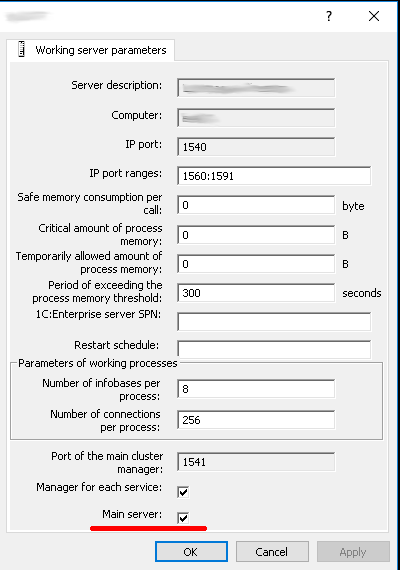
New servers can be added to the list of server nodes, and properties of existing servers can be modified. Changed values apply only to new connections and sessions.
Server nodes can also be removed, but this must be done carefully so that users currently connected to the server being removed are not disconnected. It is not possible to delete the last server node in a cluster if the Main server checkbox is selected.
During operation, the server cluster automatically distributes the load among server nodes to ensure the shortest possible service time for client applications. Cluster services are distributed evenly across server nodes by service type, infobase, and session.
When a client connects to an infobase, the server cluster selects the server nodes with the highest available performance at that moment. Existing connections can also be moved to another server node. This process is called load balancing and will be described in the next article.
Summary
We have seen how the 1C platform implements fault tolerance and scalability in the server cluster. Thanks to these mechanisms, when a worker process fails on one server, or even when an entire server in the cluster fails, users can continue working without data loss and without being disrupted by the incident.

Writen by
1C Developer
20+ years of experience in the software industry in Russia, UAE and Germany. My main fields of expertise are developing and implementation of business applications (Retail, CRM, WMS, and Accounting) and integration of software with POS equipment and web portals.


