1C Server Cluster. Part 3. Load Balancing

As we learned from the previous articles, the 1C server cluster is not a static set of processes, but a dynamic system capable of self-recovery after failures and scaling as new servers are added. This naturally raises a question: how does the cluster ensure even load distribution across all nodes? How does it decide which specific server or worker process should handle a new user so that no bottlenecks appear?
The answer lies in the sophisticated load balancing mechanism integrated into the core of the cluster. This is the focus of today’s article.
In short, load balancing is the automatic distribution of client connections and computational tasks across all available worker processes and cluster servers. The goal is to maximize overall performance and minimize response time for every user.
How the Cluster Makes Decisions: Statistics Collection
The entire load balancing system relies on continuous statistics collection and analysis. Each worker process (rphost.exe) constantly measures its key performance metrics:
- CPU load: how busy the process is with calculations.
- Call count: how many client requests were processed during the recent measurement interval.
- Average call execution time: how quickly the process handles typical requests.
- Active connections: how many clients are currently being served.
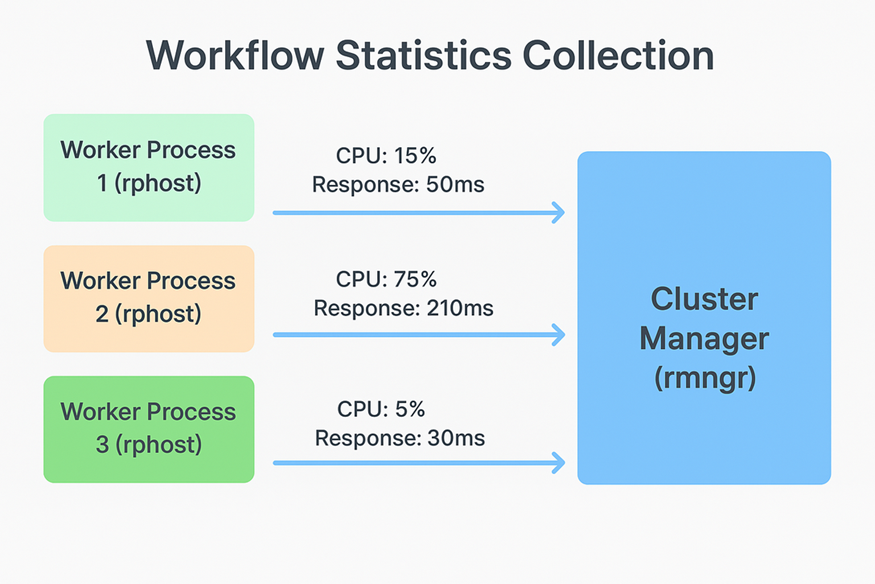
All this information is sent in real time to the main cluster manager (rmngr.exe). As a result, the cluster’s central controller always has an up-to-date view of the load across all worker processes.
Performance Index: The Main Selection Criterion
When a new client connects to the cluster, the manager must choose the optimal worker process for them. Simply counting connections is not sufficiently accurate. One process might serve ten users performing lightweight operations, while another serves only two users running complex reports, making the latter significantly more loaded.
To make an accurate decision, the 1C platform uses an intelligent metric: the Performance Index. It is calculated dynamically based on collected statistics, primarily CPU load and response time. The lower the index (closer to zero), the more free and efficient the process is.
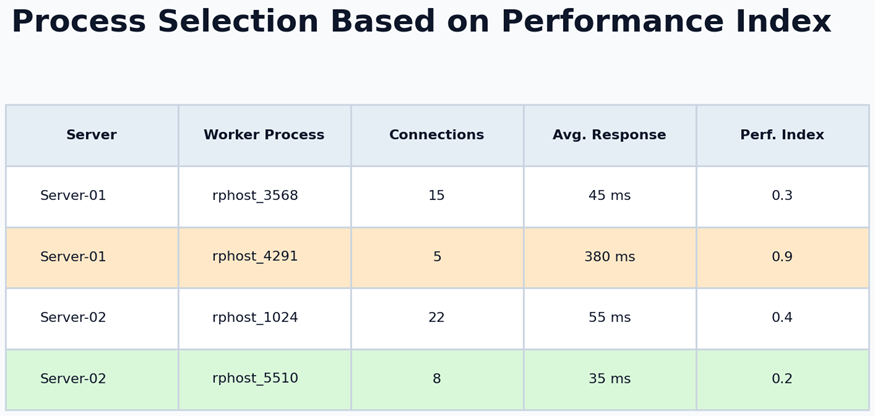
The cluster manager assigns the new client to the worker process with the lowest Performance Index. This ensures intelligent load distribution, not simple round-robin switching.
On-the-Fly Balancing: Seamless Redistribution
What happens when the load changes during operation? For example, if users on one server begin running resource-intensive operations simultaneously.
The 1C cluster reacts to such scenarios by performing dynamic, on-the-fly balancing. Existing client connections can be moved in the background from heavily loaded worker processes to less loaded ones. This may even involve moving a session to a different physical server.
Technically, this is done by instructing the client to reconnect to a different worker process. All session data remain intact, so the session state is preserved. To the user, this looks like a brief pause of one or two seconds, after which work continues normally.
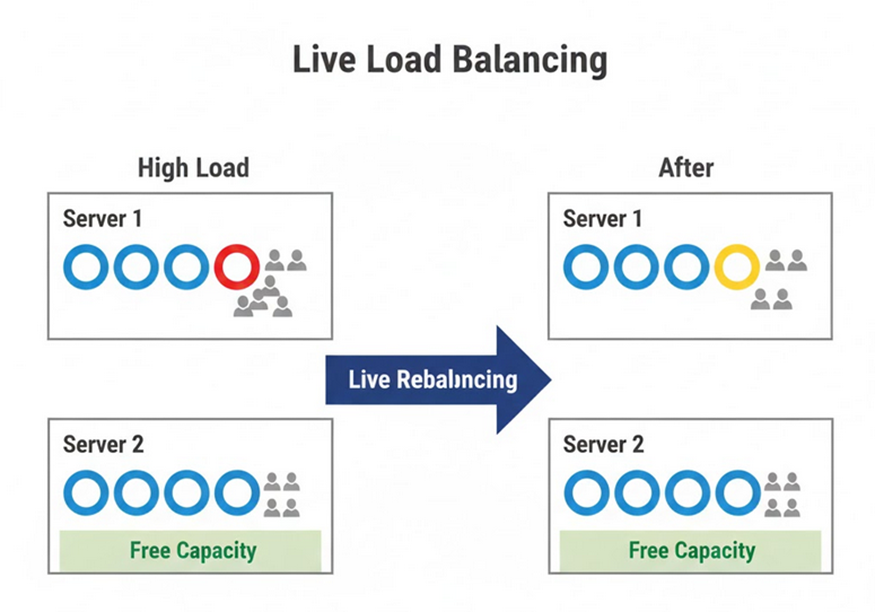
The transfer is transparent. Since all session data are stored in a dedicated service (as discussed in Part 2), reconnecting to another process does not lead to data loss, and the user continues working from the same place.
The Role of the Central Server and Cross-Platform Compatibility
All load balancing logic is handled by the main cluster manager running on the central server. Because the cluster may include servers running different operating systems, the balancing mechanism works equally well on all supported platforms. Decisions are made strictly based on collected performance metrics, independent of the underlying OS.
Configuration and Tuning
While the primary balancing work is automatic, administrators have tools to fine-tune cluster behavior. These tools are available in the standard 1C Server Administration Console.
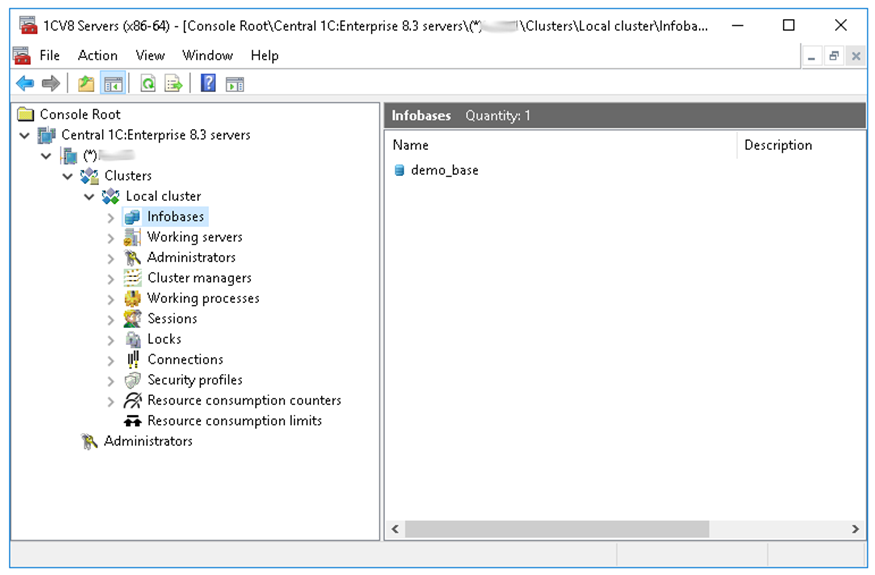
Cluster behavior is configured primarily using Functionality assignment rules.
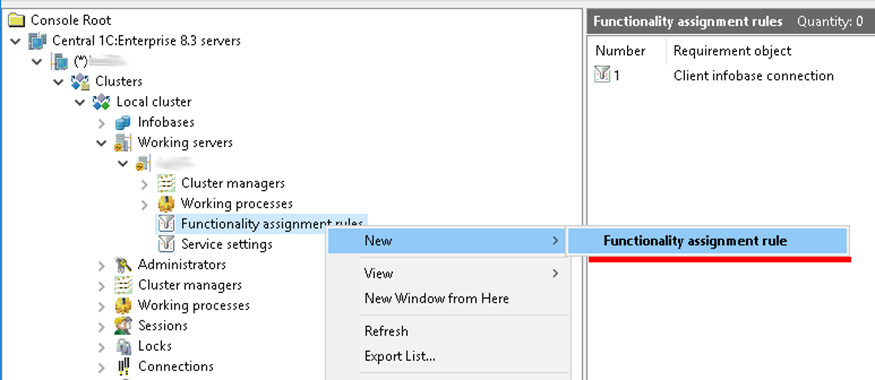
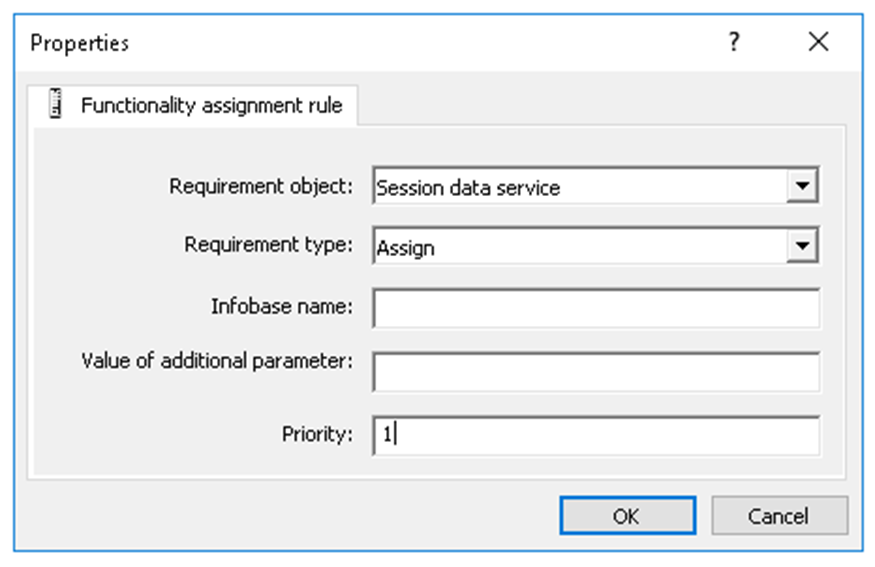
The administrator must specify several parameters:
- Requirement object: for example, selecting Session data service forces session data to be written to the server where the rule is configured.
- Requirement type: in this case, Assign.
- Priority: mandatory. Session data are written to the server with the highest priority value. If no priority is set, the cluster mechanics decide where to write data at that moment.
Important note: changes to these settings are applied gradually and primarily affect new connections and sessions. This prevents sudden load spikes and avoids disconnecting existing users during reconfiguration.
Summary
We have examined how the intelligent load balancing system in the 1C server cluster operates. Continuous monitoring of the Performance Index allows the cluster not only to distribute users evenly, but also to utilize all available computing resources efficiently. Combined with the fault-tolerance and scalability mechanisms described earlier, this creates a powerful, reliable, and self-regulating foundation for enterprise-grade solutions.
In the next article, we will go a level deeper and look at how the cluster handles conflicting operations, specifically by examining the lock manager and how data integrity is maintained when thousands of users work simultaneously.

Writen by
1C Developer
20+ years of experience in the software industry in Russia, UAE and Germany. My main fields of expertise are developing and implementation of business applications (Retail, CRM, WMS, and Accounting) and integration of software with POS equipment and web portals.


