AI for 1C application developers
AI Library
Bring AI into the 1C workflows your users already know
A library for adding AI capabilities to applications built on the 1C:Enterprise platform. Help users fill forms, understand reports and work with documents through a shared integration layer.
 Your 1C ApplicationReports, documents and forms
Less Routine Work in a Familiar Workspace
Less Manual Data Entry
Prepare form values from source files and generate suggestions for repetitive fields. Users review the proposed data before saving.
Quicker Access to the Essentials
Read a summary before opening a long document. Ask questions about report figures alongside the report itself.
Reusable Integration for Your Team
Share provider connections and prompts across features. Configure access and usage limits, and monitor usage statistics by user and task.
AI Capabilities for Everyday Business Tasks
Developers embed the required features into application forms. Administrators choose providers, configure prompts and enable access for users.
Form Autofill from Photos and PDFs
Read a scanned document and prepare header fields and tabular section rows in a 1C form. Match recognized values with existing records, resolve ambiguous matches and review the result before saving.
See Form Autofill →Report Analysis in Context
Ask questions alongside a report, request an explanation, compare reports with one another or with external files or use a configured analysis prompt. Continue the conversation and attach supporting files when the selected provider supports them.
See the Report Assistant →File Summarization, Comparison and Translation
Get a summary, identify differences between files, recognize text or translate document text into a selected language. Shared background processing stores results for supported file operations.
See File Processing →Value Suggestions and Bulk Updates
Suggest a value for a configured field, fill several fields on a card or prepare suggestions for a list of records. Review candidates before applying changes.
See Value Suggestions →Data Grouping
Organize selected catalog items into a proposed folder structure using chosen attributes and a prompt. Adjust the suggested groups before applying them. This feature must be enabled in the configuration for the selected provider.
Business Process Assistance and Chat
Use AI to help create or improve business process flowcharts and address process-related issues. Add a conversational bot to the 1C:Enterprise Collaboration System for assistance within a familiar chat. Available scenarios depend on integration.
AI Library is an integration toolkit for developers. The features users see depend on the application, embedded forms, permissions and selected provider or model.
See AI in the Application
The examples below show AI Library features implemented in 1C:ERP World Edition. Screens show that implementation and may differ from your configuration or library version.
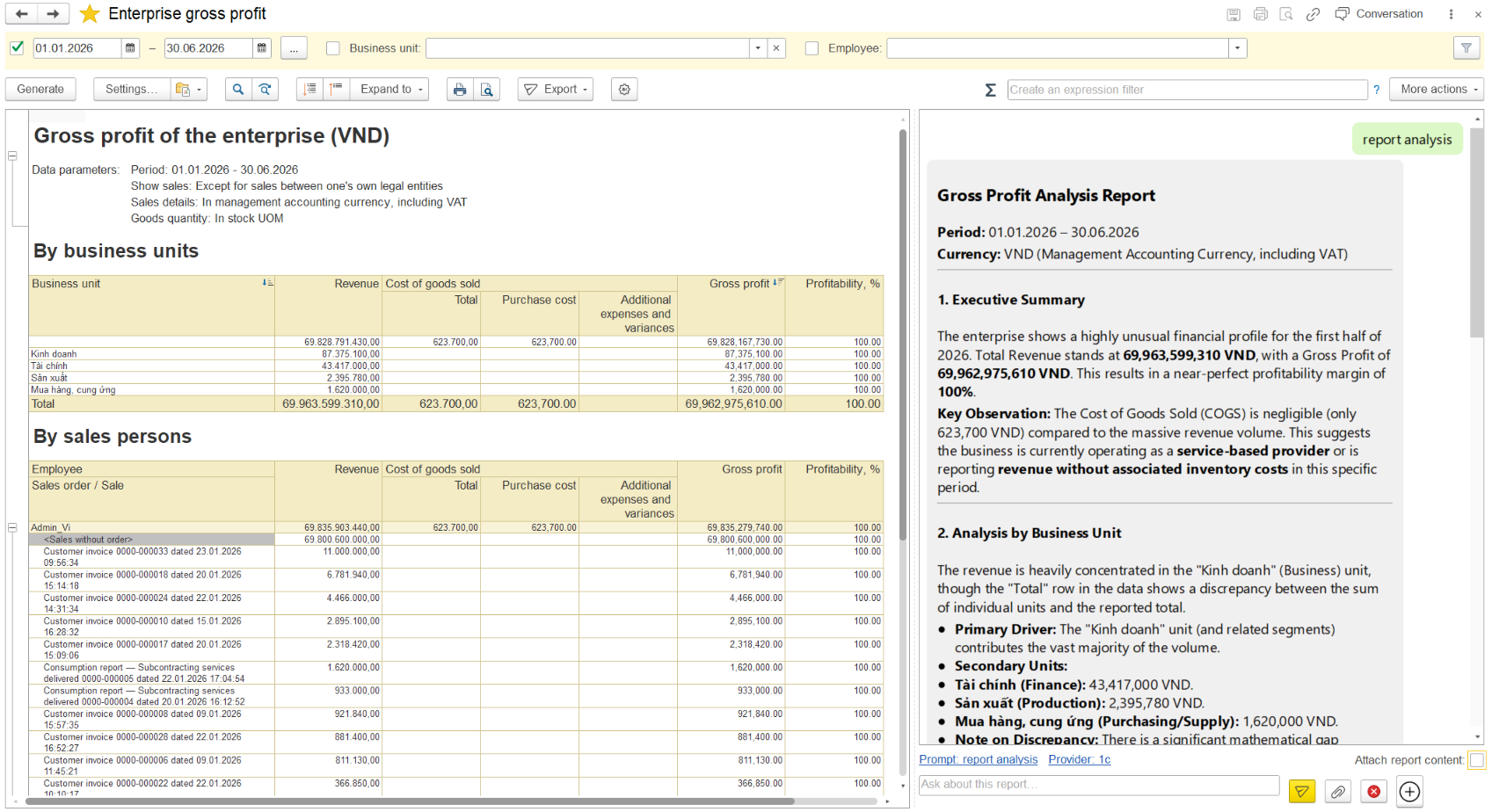
The gross profit report stays visible while the AI assistant presents an analysis in the panel on the right.

A sales order form contains recognized values and a message identifying fields that need checking.
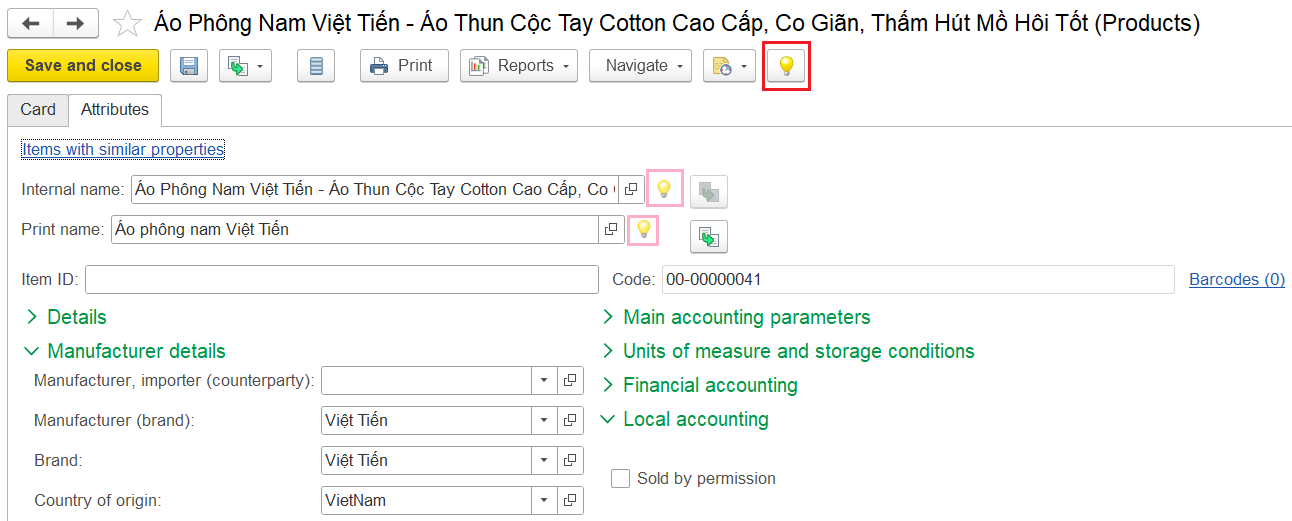
AI suggestion buttons appear beside configured fields on a product card and on its command bar.
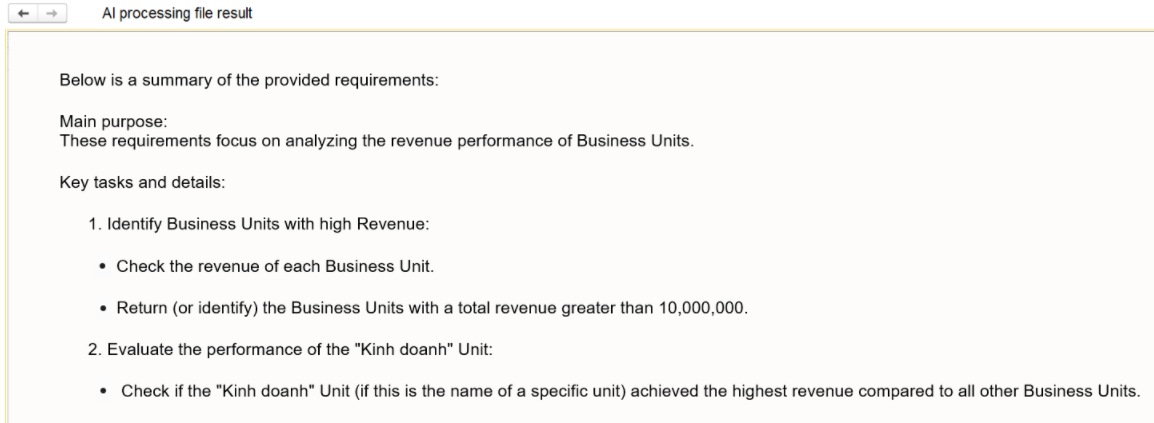
The file processing result presents an AI-generated summary for the selected document.
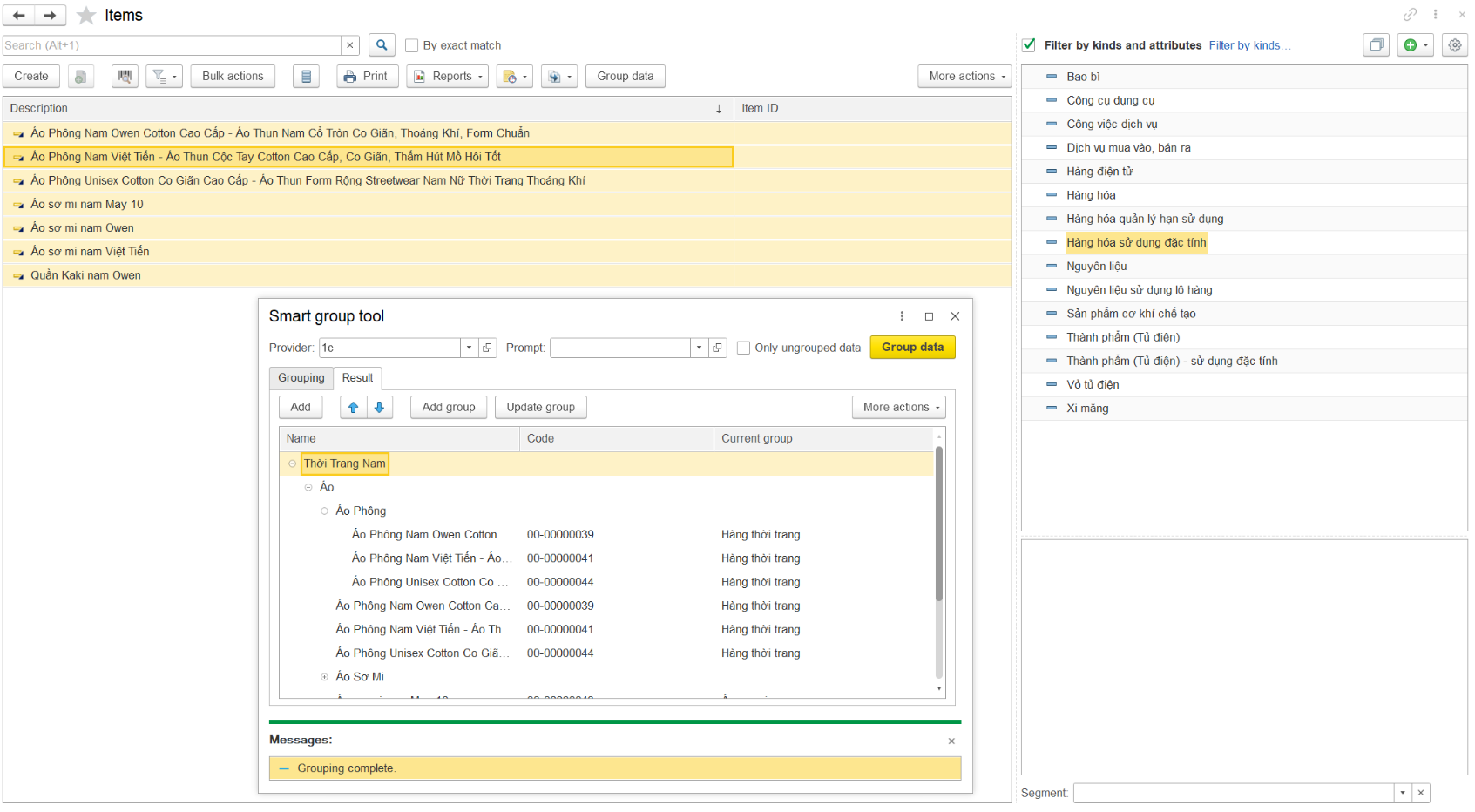
The grouping tool shows a proposed hierarchy for selected items, ready for review and adjustment.
A Shared AI Layer Inside Your 1C Solution
Application code calls the library’s feature interface. AI Library resolves the configured provider, prepares the request and returns the result to the application.
Application
Your 1C Solution
ERP, CRM, document management or another 1C:Enterprise application
- Forms and reports
- Files and business objects
- User review and saving
Embedded library
AI Library
- Features: forms, reports, documents and business processes
- Core: prompts, routing, background jobs and result handling
- Controls: permissions, token usage, limits and optional logging
- Provider adapters: shared calls to supported AI services
External AI services
Supported AI Services
ChatGPT (OpenAI), Claude, Gemini, Grok and GigaChat
- Configured model and credentials
- Features supported by that model
- Custom provider integration through extension hooks
1C application ⇄ AI Library ⇄ selected provider API
How Form Autofill Works
- 01Select a Source File
A user chooses a photo, scan or PDF from a configured form.
- 02Extract Structured Data
The library uses the selected AI model to extract structured data from the source file.
- 03Match Application Records
Recognized values are matched to catalog records using configured rules.
- 04Review and Save
The user checks the proposed values, resolves uncertain matches and saves the changes.
Choice and Control for Administrators
Providers and Reusable Prompts
- Assign a provider and model to a feature, with a default for each task.
- Reuse system and user prompts across workflows.
- Adapt the integration through overridable modules.
Access and Usage
- Grant basic and feature-specific roles.
- Track token consumption by user, feature and provider.
- Configure usage limits with blocking, warning or monitoring options. Request logging and retention cleanup are optional.
Cloud processing sends request content to the chosen provider. Your organization determines which data may be sent and configures the integration accordingly. AI-generated content requires user review.
Getting Started with AI Library
Start with one workflow and the forms where it will help users most. A developer integrates the library, then an administrator configures and enables the chosen features.
- 01Choose the Use Case
Identify the documents, reports or fields to support.
- 02Embed the Library
Merge the supplied AI Library components into the configuration and connect the required form handlers.
- 03Configure Access
Set up provider credentials, models, prompts, roles and usage limits.
- 04Test with Your Data
Check the results and make sure records were matched correctly before enabling the workflow for users.
Is AI Library a standalone application?
It is a developer-facing library delivered for integration into a 1C:Enterprise configuration. Ready-to-embed features provide the user interface after a developer connects them to the relevant forms.
Which AI providers can I use?
AI Library supports integrations with ChatGPT, Claude, Gemini, Grok and GigaChat. Supported operations differ by provider and model. Developers can add provider integrations through the library’s extension hooks.
What are the implementation requirements?
AI Library requires 1C:Enterprise platform version 8.3.27 or later and recommends Standard Subsystems Library 3.1.11.392 or later. Integration without that library requires adapting the relevant overridable modules. You also need access credentials for your selected AI provider.
Does AI save changes automatically?
Form autofill prepares values in the form for review. The user saves the changes. Bulk value suggestions and data grouping have explicit actions for applying reviewed results.
Discuss AI Library for Your 1C Solution
Tell us about your application and the workflow you want to improve. Request details about the library, integration requirements or a demonstration.
Available capabilities depend on the library version, application integration and selected AI model. Examples illustrate specific implementations.
