1.1 Why Use 1C:EDT
1.2 Downloading and Installing 1C:EDT
1.3 Installing EDT
1.1 Why Use 1C:EDT
1C:Enterprise Development Tools (1C:EDT) is a modern, extensible environment designed for developing 1C:Enterprise applications. It is based on Eclipse, a free and widely used integrated development environment (IDE) for cross-platform modular applications.
If you are used to working in Designer, you might wonder why you should switch to EDT.
Here are the key advantages:
1. True Team Development
· EDT is fully integrated with Git, the most popular version control system.
· Each developer works in their own local project copy, which eliminates shared access conflicts.
· Merging changes occurs at the file level rather than at the object level, allowing more flexible and accurate merging.
2. Modern Code Tools
· Smart autocompletion that understands the development context.
· Instant navigation throughout the project and codebase.
· One-click refactoring for easier code maintenance.
· Powerful search with support for regular expressions.
3. Flexible Development Organization
· Support for branching to work on different tasks in parallel.
· Version tagging for release management.
· Built-in support for pull-request (merge-request) workflows.
4. Extensible Architecture
· Ability to install additional plugins.
· Integration with CI/CD pipelines (for example, in GitLab) for automated testing, building, and deployment.
· A customizable interface that adapts to your workflow.
If you need support for parallel development and version control, EDT is the recommended environment.
Note: EDT requires more RAM than Designer. The larger the project, the more free memory you will need.
For comfortable work, it is best to have at least 4 GB of free RAM so projects load and build quickly.
1.2 Downloading and Installing 1C:EDT
Let’s go through the installation step by step.
- Go to https://1c-dn.com.
If you do not have an account, create one and sign in. - Scroll down to the Downloads section at the bottom of the page.
Find the line 1C:Enterprise Development Tools (available).
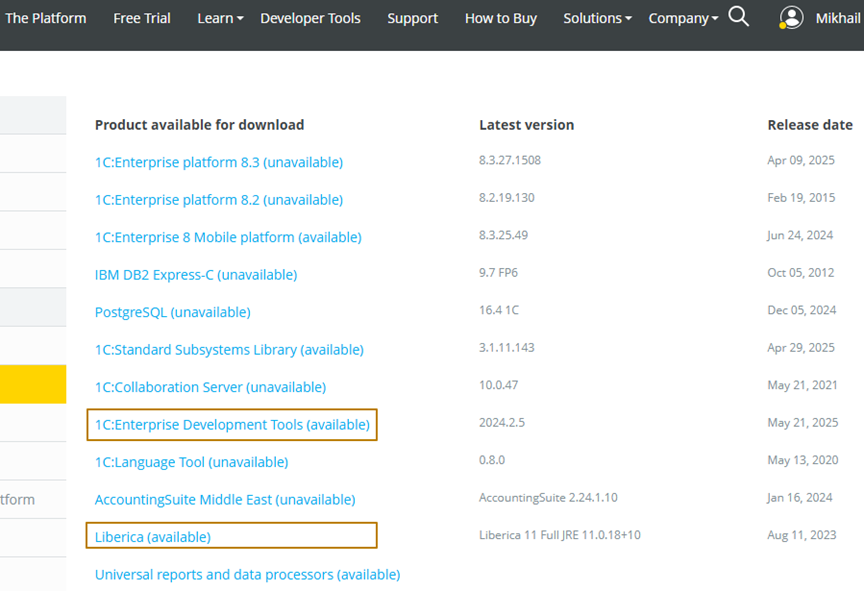
- Follow this link to the EDT versions page and download the latest version.
- Before installing EDT, you need to install the Java Development Kit (JDK).
o Starting from EDT version 2024.1.1, you need JDK 17 (Full version).
o If it is not available on 1c-dn.com, search for Liberica JDK 17 in your browser.
Go to the vendor’s site, select your operating system, choose Full JDK, and download the installation package. 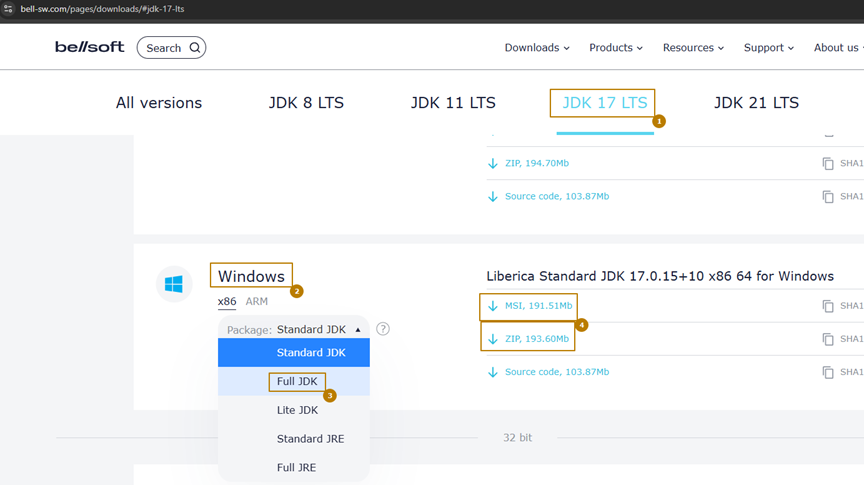 —
—
1.3 Installing EDT
1. After installing Java, run 1ce-installer.exe to install 1C:EDT.
2. In the installation wizard, specify the path to a directory with enough free space in the Installation home field.
Attention:
Once EDT is installed, the installation directory cannot be changed when installing other versions.
To change it, you need to uninstall all EDT versions and remove the installer files first.
After installation is complete:
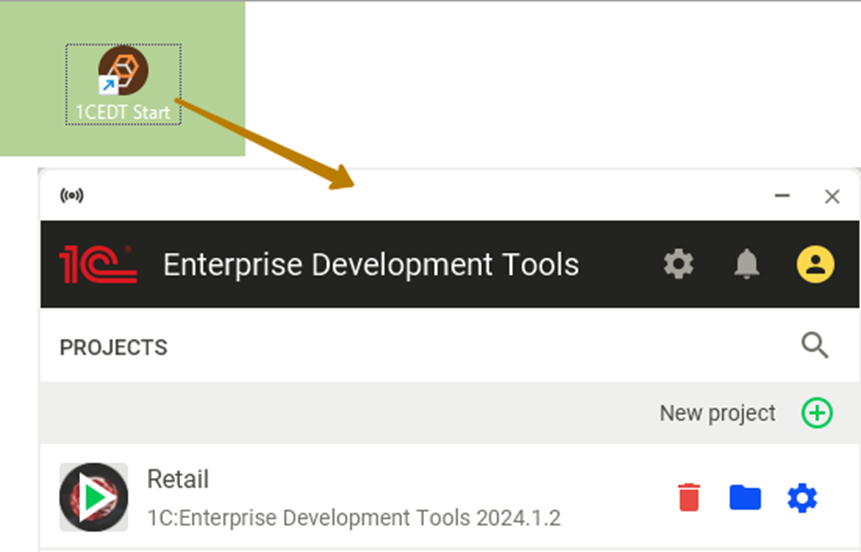
1. Locate and launch the 1CEDT Start shortcut.
2. The EDT Start window opens. You will see:
o A Sign in button (for authorization via its.1c.ru)
o A New Project button
You can skip the login step if you wish, it is required only for automatic version installation and updates.
Simply close the login window to continue.
Once EDT starts, you will see a project list, which will be empty if this is your first launch.
✅ Next Steps:
Now that EDT is installed and running, you can proceed to Creating Your First Project, which we will cover in the next section.
