Characteristics
The Characteristics Mechanism is one of the application-level mechanisms of the platform. It makes it possible to organize the storage of object properties (catalogs, documents, and so on) that are not yet known at the time an application is developed. As a result, users can independently define new properties for items, such as color, size, dimensions, power rating, and others.
Each item group can have its own set of properties. For refrigerators, this may include freezer capacity, number of compressors, and noise level. For computers, this may include RAM size and hard drive capacity. For clothing, this may include size, height, and color.
Later, these characteristics can be used to build reports, analyze sales volumes, and obtain other information required for decision-making.
The task of describing characteristics consists of two stages: creating the characteristics and storing the values of those characteristics. For example, to specify that a particular clothing model has size 48, height 5, and the color black, you must first create the following characteristics, if they have not yet been created in the application:
- Size, with the Number value type
- Height, with the Number value type
- Color, with the Catalog Colors as the value type
Once the required characteristics have been created, you can specify their specific values for the selected item:
- Size = 48
- Height = 5
- Color = Black
Each of these stages is implemented using different application objects:
- Charts of Characteristic Types
A chart of characteristic types is used to create and store the list of characteristics that can be used in the application. Learn more…
- Information Registers
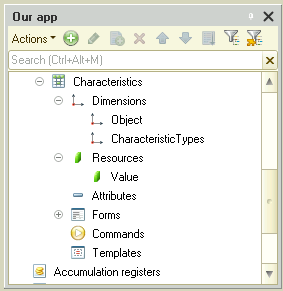
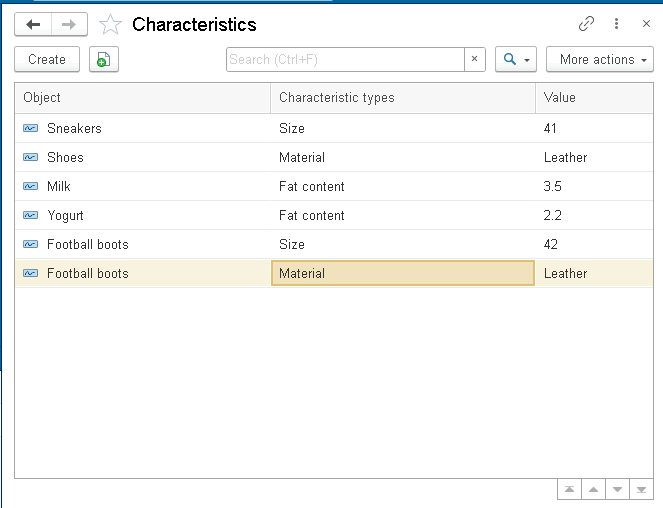
An information register can be used to store the values of specific characteristics defined for an application object. For example, to store item characteristics, you can use an information register whose dimensions are Item and Characteristic, and whose resource is the Characteristic Value
The records stored in this register will look as follows:
Configuring Characteristics in the Configuration Tree
For each configuration object that supports the use of characteristics, you can define, directly in the configuration tree, the relationship to the list of its characteristics and to the configuration object in which the values of those characteristics are stored.
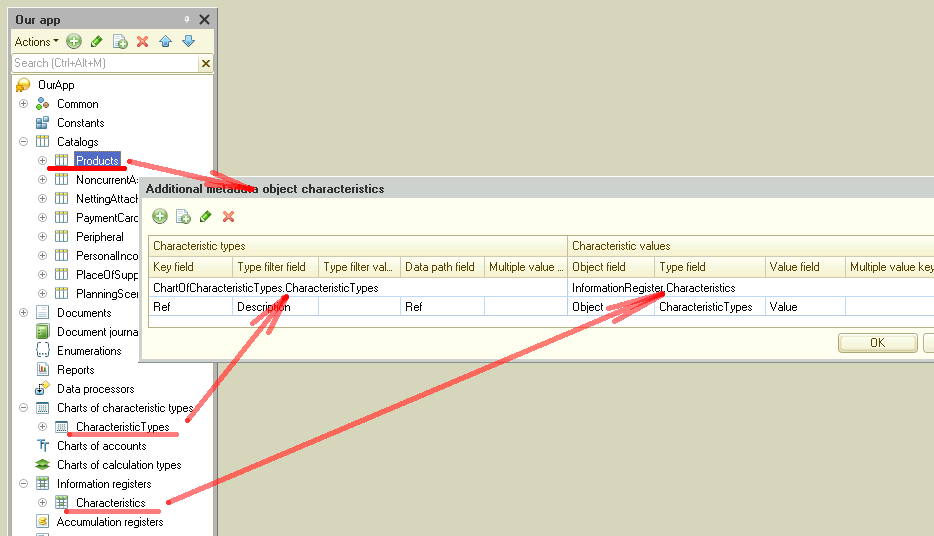
As a result, all reports and dynamic lists that include this configuration object will automatically incorporate its characteristics. This eliminates the need for developers to describe this relationship separately in each new report or dynamic list.
