Client-Server Mode
Client-server mode is one of the ways the 1C:Enterprise system can operate. It is designed for use in workgroups or at the enterprise level and is implemented based on a three-tier client-server architecture.
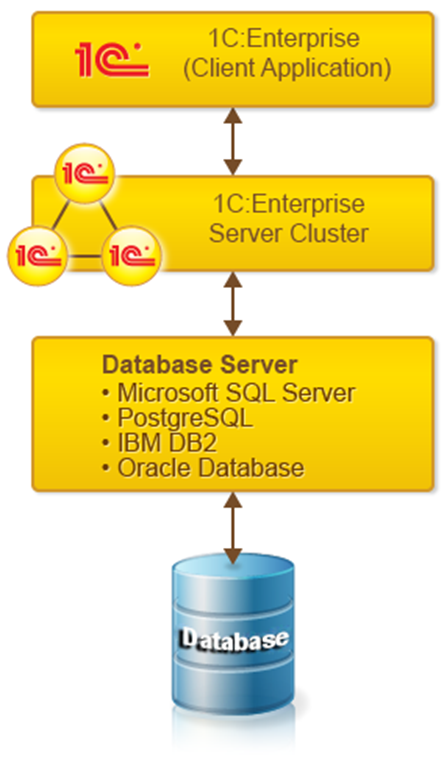
The client-server architecture divides the system into three distinct parts that interact with each other in a defined way:
● 1C:Enterprise Server Cluster
The program running on the user’s computer (the client application) interacts with the 1C:Enterprise server cluster, and the cluster, when necessary, communicates with the database server.
Physically, the 1C:Enterprise server cluster and the database server can be located on the same computer or on different ones. This allows the administrator to distribute the load across servers when needed.
Using the server cluster enables the execution of the most resource-intensive data processing operations on the cluster itself. For example, even for complex queries, the program on the user’s computer only receives the required dataset, while all intermediate processing is handled on the server. Typically, it is much easier to increase the power of the server cluster than to upgrade all client machines.
Another important aspect of the three-tier architecture is ease of administration and organized user access to the infobase. In this mode, users do not need to know the physical location of the configuration or database. All access goes through the 1C:Enterprise server cluster. To access an infobase, the user only specifies the cluster name and the infobase name, while the system requests the corresponding username and password.
1C:Enterprise uses the DBMS’s capabilities for efficient data retrieval:
● The query mechanism is designed to maximize the use of the DBMS for calculations and reporting.
● Viewing large dynamic lists is supported without excessive queries to the database, while providing efficient search, filtering, and sorting options to the user.
Deployment and administration of client-server mode are relatively simple. For example, creating a database is performed directly during the launch of Designer (similar to the file mode).
Client Applications
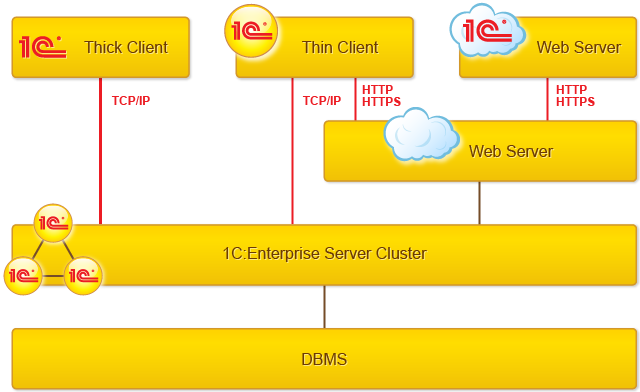
Client server mode supports two connection options: direct to the cluster or via a web server. In the case of direct connection, the thick client and thin client use the TCP/IP protocol. When connecting through a web server, the thin client and web client use HTTP or HTTPS.
Server Cluster
The 1C:Enterprise Server Cluster is a core component of the platform that ensures interaction between users and the database management system in client-server mode. The cluster enables uninterrupted, fault-tolerant, and concurrent work of numerous users with large infobases. Read more…
Database Server
The following can be used as a database server:
● Microsoft SQL Server
● PostgreSQL
● IBM DB2
● Oracle Database
Server Cluster Administration
The platform package includes a set of tools that allow the administrator to manage the cluster composition, infobases, and user connections. Read more…
Executing Core Functionality on the Server
All work with application objects, database read and write operations are performed only on the server. Form functionality and command interfaces are also implemented on the server.
The server prepares form data, arranges elements, and records data after changes. On the client side, the already prepared form is displayed, data is entered, and calls to the server are made to record input and perform other necessary actions.
Similarly, the command interface is generated on the server and displayed on the client. Reports are also generated fully on the server and displayed on the client.
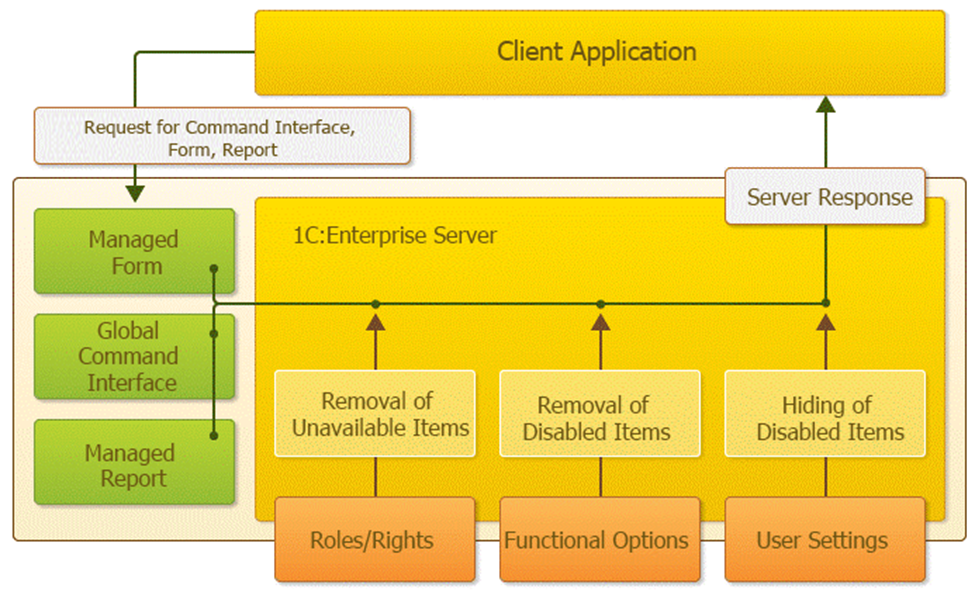
The platform mechanisms are designed to minimize the amount of data transferred to the client computer. For example, data from lists, tabular sections, and reports are sent from the server gradually as the user views them.
Operations performed on the server include:
● Database queries
● Data recording
● Document posting
● Various calculations
● Running data processors
● Report generation
● Preparing forms for display
Operations performed on the client include:
● Receiving and opening forms
● Displaying forms
● Interacting with the user (warnings, prompts, etc.)
● Small, quick calculations in forms (for example, multiplying price by quantity)
● Working with local files
● Working with retail equipment
Using the 1C:Enterprise Language on the Client
Form functionality can be controlled not only on the server but also on the client. The 1C:Enterprise language is supported on the client in cases where calculations related to the displayed form are needed. For example, quickly (without calling the server) calculating a document row amount based on price and quantity; asking the user a question and processing the response; reading a file from the computer’s file system and sending it to the server.
However, the use of the 1C:Enterprise language on the client is strictly limited. Client procedures in modules are explicitly separated from server ones, and only a restricted subset of the 1C:Enterprise language object model is available.
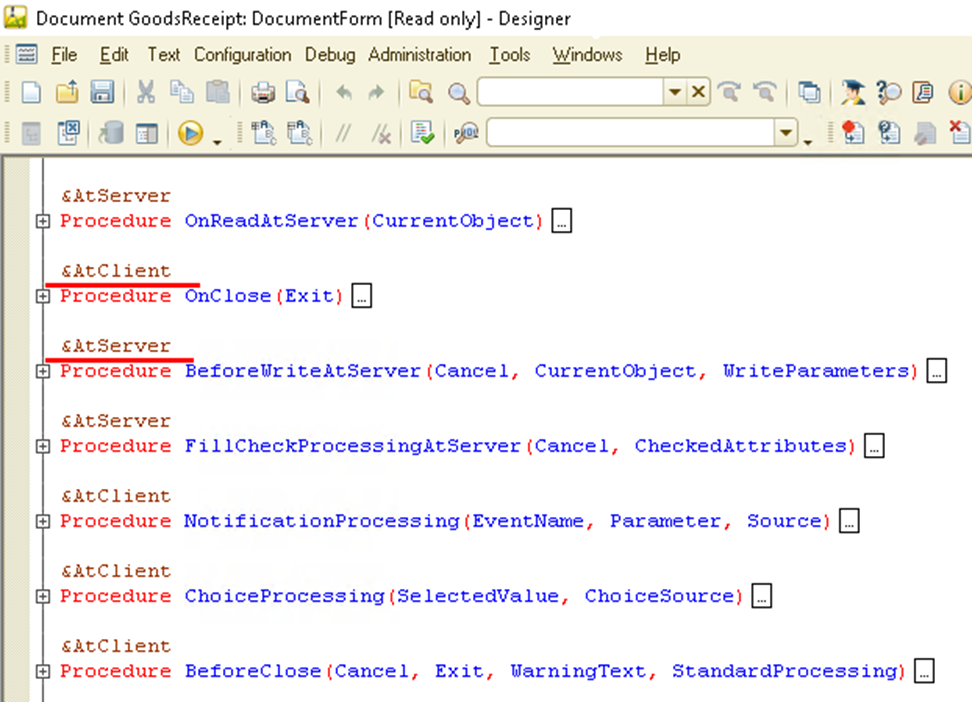
Direct access to the database on the client is not allowed. Direct work with application objects is also not allowed. For example, such 1C:Enterprise language types as CatalogObject.<name> are not available. Queries cannot be executed directly on the client. If data-related actions are needed in client code, server procedures must be called, and they will access the data.
