The web client is one of the 1C:Enterprise client applications. Unlike traditional options such as the thick client or the thin client, it doesn’t need to be installed on the user’s computer. There’s no executable file, so you won’t find it in the Start menu or among installed programs. It’s called a web client because it runs entirely through a browser rather than from a local installation.
Instead of launching as a separate application in the operating system, it opens directly in a web browser such as Internet Explorer, Mozilla Firefox, Google Chrome, or Safari. The user simply opens the browser, enters the address of the web server hosting the infobase, and the application loads automatically.
The web client relies on DHTML and HTTPRequest technologies. During operation, client modules created in the configuration are automatically compiled from the 1C:Enterprise language and executed on the client side.
Regardless of which client application is used, all development takes place in 1C:Enterprise Designer. Both server and client code are written in the same 1C:Enterprise language.
Working in a Web Browser Without Installation
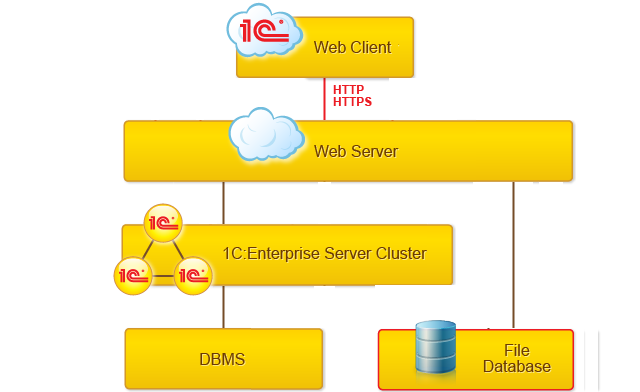
To work in browser mode, a web server must be configured to interact with 1C:Enterprise. The browser communicates with the server via the HTTP or HTTPS protocol, while the server connects to 1C:Enterprise in either file-based or client-server mode.
Both Apache and IIS are supported as web servers.
Progressive Web Apps
The platform also supports PWA (Progressive Web Apps) technology. PWAs work in both desktop and mobile browsers, allowing developers to create web applications that look and behave like native ones, with nearly the same performance.
You can install such an application as a standalone PWA. After installation, an icon appears on the desktop for quick access. When launched, the app looks like a native program without the browser’s address bar or navigation buttons such as Home, Forward, and Back.
The 1C:Enterprise language includes an object model that supports PWA installation and manages installation start and completion events.
OpenID Connect Authentication
The system supports OpenID Connect providers. Alongside the existing authentication methods, users can sign in to 1C:Enterprise using credentials from other websites that use OpenID Connect.
Mobile Device Support
The web client can also run on mobile devices, though with reduced functionality. It is supported in Google Chrome on Android and in Safari on iPhone and iPad. Only the core features are available in this mode.
