The thin client is one of the 1C:Enterprise client applications. In the Windows operating system, its executable file is 1cv8c.exe. In Linux, it is simply named 1cv8c.
It is called a thin client because it supports only a limited subset of the functionality provided by the 1C:Enterprise language. Not all applied data types are available in this mode. Instead, the thin client operates with a restricted set of language types intended for displaying and modifying data in memory. All interactions with the database, business objects, and query execution occur on the server side. The thin client only receives data that is already prepared for display.
Connecting via the Internet
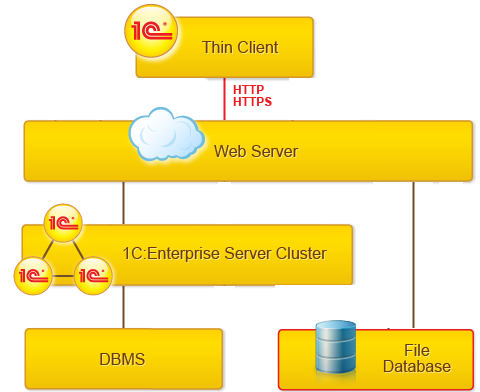
The thin client enables access to the 1C:Enterprise interface over the Internet. This requires a web server configured to work with 1C:Enterprise.
The thin client communicates with the web server via the HTTP or HTTPS protocol. The web server, in turn, interacts with 1C:Enterprise in either file-based or client-server mode.
Supported web servers include Apache and IIS. Learn more.
Client-Server Mode
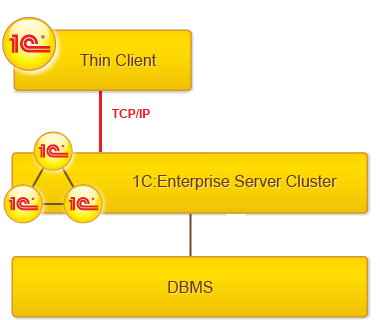
In client-server mode, the thin client connects directly to the server cluster using the TCP/IP protocol. Learn more.
File Mode
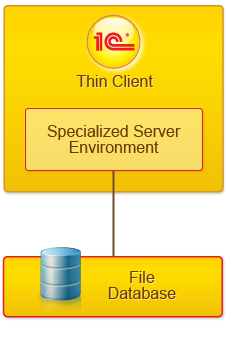
When 1C:Enterprise operates in file mode, the thin client interacts directly with the file database. In this case, the thin client requires direct file access to the database, for example, through a shared network resource.
When operating in file mode, the thin client creates a specialized environment on the computer where it is launched. Within this environment, the following actions are performed:
- Loading the necessary server components required for operation
- Loading the applied configuration
- Performing other actions required to ensure proper system operation with the infobase
From the thin client’s perspective, this environment acts as a server. From the operating system’s perspective, this specialized environment is not a separate process but runs within the thin client process itself.