The Platform
Free Trial
Learn
Knowledge Base
1C Online Courses
Blog
Forum
Developer Tools
Support
How to Buy
Solutions
AccountingSuite
1C:ERP World Edition
1C:Trade Management
1C:Analytics
1C:Document Management
Company
News
Success stories
Become a Partner
Log on
Free sign up
1C:DN
>
Knowledge Base
>
Knowledge base
>
Practical Developer Guide
>
Lesson 13 (4:30). Reports
>
Displaying data as a spreadsheet
>
In Designer mode
>
Query for a data set
GETTING STARTED
1C Online Courses
Hello, 1C (Quick Start)
Practical Developer Guide
1C:ENTERPRISE PLATFORM
Knowledge Base Home
Core Documentation
Standard Subsystems Library (SSL)
Mobile Development
Best Practices
1C:ENTERPRISE DEVELOPMENT TOOLS
1C:EDT Training Guide
1C:EDT User Guide
COMMUNITY & INFO
TechBlog
Developer Forum
Glossary
Let us specify the query data set.
Select the
Sales.Turnovers
virtual table as the data source.
Select all fields from this table (fig. 13.109).
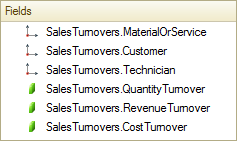
Fig. 13.109. Selected fields
Click
OK
.
Next page:
Analyzing query text
