• The Platform
  • Free Trial
  • Learn
    • Knowledge Base
    • 1C Online Courses
    • Blog
    • Forum
  • Developer Tools
  • Support
  • How to Buy
  • Solutions
    • AccountingSuite
    • 1C:ERP World Edition
    • 1C:Trade Management
    • 1C:Analytics
    • 1C:Document Management
  • Company
    • News
    • Success stories
    • Become a Partner
Log on Free sign up
1C:DN > Knowledge Base > Knowledge base > Practical Developer Guide > Lesson 18 (3:40). Using calculation registers > Employee accruals report
  • GETTING STARTED
  • 1C Online Courses
  • Hello, 1C (Quick Start)
  • Practical Developer Guide
  • 1C:ENTERPRISE PLATFORM
  • Knowledge Base Home
  • Core Documentation
  • Standard Subsystems Library (SSL)
  • Mobile Development
  • Best Practices
  • 1C:ENTERPRISE DEVELOPMENT TOOLS
  • 1C:EDT Training Guide
  • 1C:EDT User Guide
  • COMMUNITY & INFO
  • TechBlog
  • Developer Forum
  • Glossary

Let us see how one can use the data that is stored in the calculation register to get an aggregate employee accruals report (fig. 18.21).
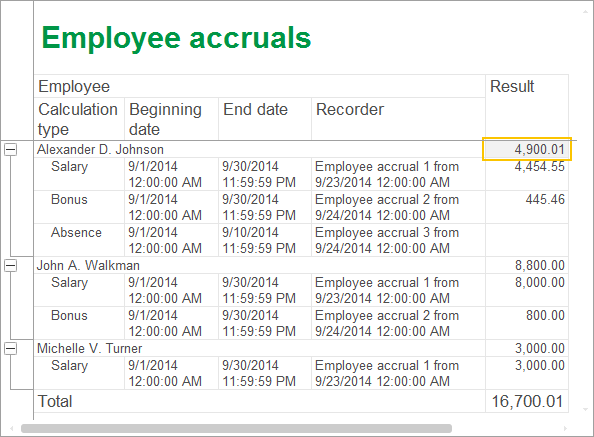

Fig. 18.21. Resulting report

Next page: In Designer mode

  • Blog
  • Applications
  • Downloads
  • Support
  • Forum
  • About
  • 1C:Enterprise
  • Getting started
  • Knowledge base
  • Buy online
  • Learn
  • Developer tools
telegram

© 1C LLC. All rights reserved